


Rogers Xfinity Internet provides a built-in security feature that blocks over 40 million cyberthreats each month for Canadian subscribers. This network-level protection aims to secure the growing number of connected devices found in modern households.
Launch Len Media views this tool as a vital baseline for home security, though it should not be considered a replacement for comprehensive endpoint protection. Understanding the limits of this service is essential for maintaining robust smart home device safety.
As households integrate more technology, the risk of digital intrusion increases. This analysis examines how the service functions and where users must still take individual responsibility for their data.
The mechanics of network-level defense
The Advanced Security feature operates directly at the gateway level, which is the entry point for internet traffic in a home. By filtering data before it reaches individual devices, the system can identify and block known malicious websites and suspicious activity. Source: MobileSyrup.
According to Rogers, this approach is particularly effective for IoT devices that often lack traditional security interfaces. These include smart cameras, doorbells, and connected light bulbs that might otherwise be vulnerable to remote access attempts.
The system uses machine learning to adapt to emerging threats, according to research from Rogers. This allows the network to stay updated against evolving cyber risks without requiring manual intervention from the user.
Data from IDC Canada indicates that 37 percent of Canadian households now use home automation devices, while 39 percent utilize smart security systems. This high adoption rate creates a broader attack surface for malicious actors, necessitating the network-level approach provided by Rogers Xfinity Internet.

Managing your digital perimeter
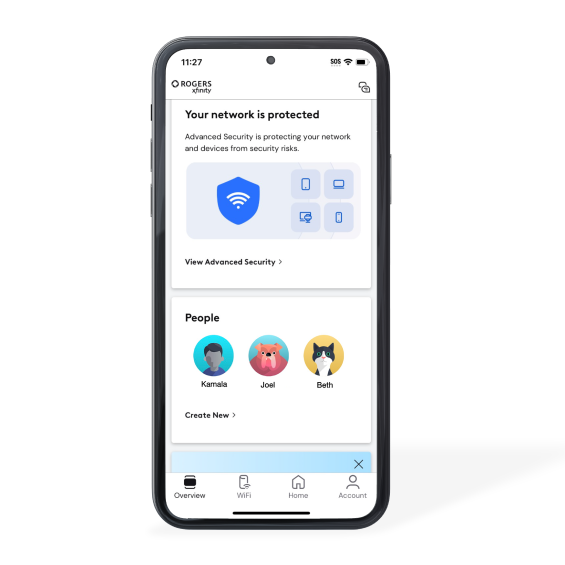
Customers manage their security settings through the Rogers Xfinity app. This interface provides a centralized dashboard where users can view security alerts and confirm that their devices are protected.
The feature is optional and can be enabled or disabled within the application. Rogers advises that for the best results, users should stick to the provided Rogers Xfinity Gateways and WiFi Pods rather than third-party mesh systems.
Using third-party hardware can create blind spots in the network. When the gateway cannot see the traffic flowing through a secondary router, the Advanced Security feature may fail to intercept threats directed at devices connected to that secondary node.
The service is designed to be ‘always on’ once activated, providing a layer of protection that does not require individual software installations on every device. This is a significant advantage for families with dozens of connected gadgets, as it simplifies the maintenance of a secure home network.
Security options and best practices
While Rogers Xfinity Internet offers a strong foundation, users should consider a layered approach to security. Relying on a single point of failure is rarely recommended in cybersecurity.
The following list outlines the primary tools and habits that complement network-level protection. These steps help mitigate the security risks that network-level filtering might miss.
Strong, unique passwords are the first line of defense for every device. If a device is compromised, a unique password prevents the attacker from moving laterally to other accounts.
Traditional antivirus software remains necessary for computers and mobile devices. These programs protect against threats that originate from external drives or malicious email attachments that bypass the network gateway.
Regular firmware updates are critical for smart home hardware. Manufacturers often release patches to fix vulnerabilities that hackers exploit to gain unauthorized remote access.
Two-factor authentication should be enabled on all accounts linked to your smart home devices. This adds a layer of verification that prevents unauthorized logins even if a password is stolen. Source: Rogers Support.
Expert analysis of the security trade-offs
Launch Len Media finds that the inclusion of Advanced Security at no extra cost provides significant value for the average consumer. It lowers the barrier to entry for basic cybersecurity, which is often neglected by non-technical users.
However, critics point out that network-level security can sometimes interfere with legitimate traffic. For instance, some VPN services or specific gaming configurations may be flagged by the system as suspicious, leading to connectivity issues.
There is also the risk of user complacency. When a service provider handles security, users may feel a false sense of total protection, leading them to ignore software updates or use weak passwords on their devices.
Despite these concerns, the benefits of blocking 40 million threats monthly outweigh the minor inconveniences for most households. The key is for users to treat the service as a safety net rather than a complete shield.
Rogers explicitly advises that Advanced Security does not replace traditional antivirus software or other security measures like strong, unique passwords.
Rogers, 2026
Concrete steps for homeowners
To get started, download the Rogers Xfinity app and verify that Advanced Security is toggled on. Check the alerts tab periodically to see if any devices have triggered a warning.
Review your device list in the app to identify any unknown hardware connected to your network. If you see a device you do not recognize, change your WiFi password immediately to disconnect all devices and then reconnect only those you trust.
Audit your smart home devices for firmware updates. Many devices have an auto-update feature, but some require you to check the manufacturer’s app or website for the latest version.
Finally, ensure that your primary computers and smartphones are running reputable antivirus software. This ensures that even if you accidentally download a malicious file while away from your home network, your device remains protected.
Frequently Asked Questions
Does Rogers Xfinity Advanced Security cost extra?
No, the service is included at no additional cost for customers who use the Rogers Xfinity Gateway and have an active internet plan.
Can I use my own router with this security feature?
Using third-party mesh systems or routers may limit the visibility and effectiveness of the Advanced Security feature. Rogers recommends using their provided gateways and WiFi Pods for the best experience.
Does this replace my antivirus software?
No, Rogers explicitly states that this feature does not replace traditional antivirus software or other security measures like strong passwords.